
领先一步
VMware 提供培训和认证,助您加速进步。
了解更多Spring Integration 2.0 Milestone 3 中引入的 UDP 和 TCP 通道适配器可在两个或多个 Spring Integration 应用程序之间,或者在 Spring Integration 应用程序与其他平台之间提供轻量级通信。
继 Oleg 关于贷款经纪人的博客 之后,我将使用相同的示例来演示如何使用 M3 中新提供的 UDP 适配器。假设贷款经纪公司首席执行官收到了一些客户关于多家银行报价过高的投诉。他要求首席信息官能否在一段时间内监控从各银行返回的报价。
由于贷款经纪应用程序是使用 Spring Integration 构建的,因此很容易进行窃听报价、过滤报价,并使用 M3 中的新 IP 适配器将它们发送到应用程序外部。这可以通过最少的重新配置来完成;下图显示了如何使用多播将高报价发送到简单的 Spring Roo 应用程序以及 Groovy 和 Perl 脚本,或者任何支持 IP 的平台。
首先,让我们显式添加聚合通道并窃听报价...
<int:channel id="quotesAggregationChannel">
    <int:interceptors>
        <int:wire-tap channel="loanSharkDetectorChannel"/>
    </int:interceptors>
</int:channel>
这会将每个报价发送到 loanSharkDetectorChannel(以及聚合器)。
下一步是设置过滤器和通道来检测贷款鲨鱼...
<int:channel id="loanSharkDetectorChannel" />

<int:filter id="loanSharkFilter"
        input-channel="loanSharkDetectorChannel"
        output-channel="loanSharkChannel"
        expression="payload.rate > 5.2"/>

<int:channel id="loanSharkChannel" />

<int:transformer ref="udpTransformer"
        input-channel="loanSharkChannel"
        output-channel="sharkOutChannel"/>

<int:channel id="sharkOutChannel" />
过滤器丢弃非贷款鲨鱼(报价 <= 5.2% 的);转换器 仅将 LoanQuote 转换为包含银行名称和费率的字符串,并用逗号分隔。
最后,我们添加 UDP 通道适配器;选择多播以便我们可以将报价发送到多个目的地...
	<int-ip:outbound-channel-adapter id="udpOut"
		channel="sharkOutChannel"
		protocol="udp"
		host="225.6.7.8"
		multicast="true"
		port="11111"/>
此适配器会将数据多播到端口 11111 上的多播地址 225.6.7.8。
现在让我们看看接收端。首先,我创建了一个带有以下脚本的简单 Roo 应用程序...
project --topLevelPackage com.springframework.integration.loanbroker.loanshark
persistence setup --provider HIBERNATE --database HYPERSONIC_IN_MEMORY
entity --class ~.domain.LoanShark
field string --fieldName name
field number --type java.lang.Long --fieldName counter
field number --type java.lang.Double --fieldName averageRate
finder add --finderName findLoanSharksByName
controller scaffold --class ~.web.SharkController
logging setup --level DEBUG
dependency add --artifactId org.springframework.integration.ip --groupId org.springframework.integration --version 2.0.0.M3
perform eclipse
(注意,在发出 perform eclipse 命令之前,我已将 pom.xml 中的 Spring 版本更改为 3.0.1.RELEASE-A)。
有关这些步骤如何生成初始 Roo 应用程序,请参阅 Roo 文档。
最后,我向 Roo 应用程序添加了一些 Spring Integration。
	<int-ip:inbound-channel-adapter id="udpIn"
		channel="channel"
		multicast="true"
		protocol="udp"
		multicast-address="225.6.7.8"
		port="11111"/>

	<int:channel id="channel" />
	<int:transformer ref="transformer"
		input-channel="channel"
		output-channel="transformedChannel"/>
	<int:channel id="transformedChannel" />
	<int:service-activator
		id="activator"
		input-channel="transformedChannel"
		ref="accumulator" />

	<bean id="accumulator" class="com.springframework.integration.loanbroker.loanshark.biz.Accumulator" />
	<bean id="transformer" class="com.springframework.integration.loanbroker.loanshark.biz.SharkTransformer" />
通道适配器接收数据包([银行名称],[费率]);转换器 将数据转换为 SharkQuote 对象,然后将其传递给 累加器。累加器会查找银行,如果需要则创建它,增加计数器并计算该银行的平均费率。
这是 Roo 应用程序的屏幕截图;单击查看大图。

此 Groovy 脚本也接收数据包...
socket = new MulticastSocket(11111)
mcast = InetAddress.getByName("225.6.7.8")
socket.joinGroup(mcast)
buffer = (' ' * 1024) as byte[]
while(true) {
    incoming = new DatagramPacket(buffer, buffer.length)
    socket.receive(incoming)
    s = new String(incoming.data, 0, incoming.length)
    println ("**Shark** " + s)
}
...此 Perl 脚本也是如此...
#!/usr/bin/perl -w
use strict;
use IO::Socket::Multicast;
my $socket = IO::Socket::Multicast->new(LocalPort=>11111, ReuseAddr=>1)
  or die "Can't start UDP server: $@";
$socket->mcast_add('225.6.7.8');
my ($datagram,$flags);
while ($socket->recv($datagram,1024,$flags)) {
	print "**Shark** $datagram\n";
}
$socket->close();
您可能需要安装 IO::Socket::Multicast 才能使此脚本正常工作。
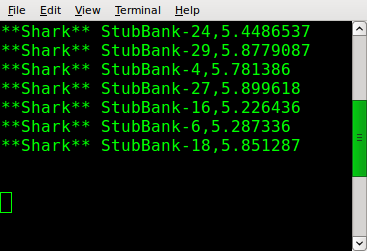
上述任一脚本都会产生此输出...
结论
这只是对新 IP 适配器的一个简要介绍。代码(贷款经纪人和贷款鲨鱼 Roo 应用程序的更新)可在 svn 中找到。
https://src.springsource.org/svn/spring-integration/trunk/spring-integration-samples/loan-broker/
https://src.springsource.org/svn/spring-integration/trunk/spring-integration-samples/loanshark/
M3 中也提供了 TCP 适配器;在此 处 阅读相关内容。
我们正在考虑创建 TCP/IP 网关以实现双向通信。如果您需要此功能,请为 JIRA 问题 投票。