
领先一步
VMware 提供培训和认证,助您加速进步。
了解更多对于视图层,Spring @MVC提供了多种选择。在本文中,我们将首先讨论您在过去几年中最可能使用视图层的方式:JSP。我们将看到使用它们的好坏方法(纯JSP,带有自定义标签的JSP,Apache Tiles)。
然后,我们将讨论一个名为Thymeleaf的新项目,您可以将其用作JSP的替代方法。
像往常一样,您可以在github上的相应应用程序中找到本文讨论的所有代码示例。
<html …> <body>
 <div style="padding-top: 50px;">
   <jsp:include page="../menu.jspx"/>
   <c:choose>
     <c:when test="${empty users}">
       Table is empty.
     </c:when>
     <c:otherwise>
      <table>
       <thead>
         <tr>
          <th> First Name </th>
          <th> Last name </th>
         </tr>
        </thead>
        <tbody>
        <c:forEach var="user" items="${users}">
        <tr>
          <td> <c:out value="${user.firstName}"/> </td>
          <td> <c:out value="${user.lastName}"/> </td>
        </tr>
        </c:forEach>
       </tbody>
     </table>
    </c:otherwise>
   </c:choose>
   <jsp:include page="../footer.jspx"/>
  </div>
 </body>
</html>
这段代码示例并非“最先进”的,因为它在8年前也可能以完全相同的方式编写。这是否意味着它已经过时了?让我们讨论一些可能的限制。
我们使用了<jsp:include />来包含JSP片段(页眉和页脚)。显然,有<jsp:include />是件好事,因为它可以避免大量复制/粘贴。但是,如果你有数百个JSP文件,你会发现自己将这些<jsp:include />标签复制/粘贴到所有JSP中。最好将所有布局信息外部化到一个专用文件中。
我们的用户页面相当小,因为它只是显示一个元素列表。我们已经有50行代码(上述代码示例已略微缩减)。你可以想象,如果我们必须显示大量内容,它会变得多么庞大。
此页面不符合HTML/CSS规范。假设Web设计师已经对其进行了原型设计,你将不得不完全重写它以使用侵入性的JSP语法。我们将在讨论ThymeLeaf时再回到这一点。

这是一个例子
<jsp:directive.attribute name="title" required="true" rtexprvalue="true" />
<body>
 <div style="padding-top: 50px;">
  <jsp:include page="/WEB-INF/view/jsp/menu.jspx"/>
  <jsp:doBody />
  <jsp:include page="/WEB-INF/view/jsp/footer.jspx"/>
 </div>
 </body>
在示例应用程序中,此文件名为mainLayout.tagx。它在我的文件系统上
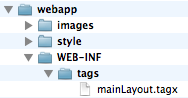
在每个JSP内部,我可以调用之前创建的标签。
如下所示,我们将custom命名空间与我们的tags文件夹关联起来。然后我们可以使用名为mainLayout的标签。
<div xmlns:c="http://java.sun.com/jsp/jstl/core" xmlns:jsp="http://java.sun.com/JSP/Page"
 xmlns:custom="urn:jsptagdir:/WEB-INF/tags">
<custom:mainLayout title="${title}/">
 <c:choose>
…
 </c:choose>
</custom:mainLayout>
注意:正如你在上面的代码示例中看到的,每个JSP都应该指定它使用的布局。如果我有几个布局,并且想将几个JSP从mainLayout迁移到customLayout,我需要编辑每个JSP文件并手动更改布局。我们稍后在讨论Tiles时会回到这一点。
自定义标签不仅可以为你外部化布局部分,还能做更多的事情。为了说明这一点,我创建了一个simpleTable标签,这样我就不必处理<thead>和<tbody>标签了。当表格为空时,它还会显示一条消息。我的JSP文件现在看起来像这样
<custom:mainLayout title="${title}/">
 <custom:simpleTable collection="${users}" headerLabels="First Name, Last Name">
   <c:forEach var="user" items="${users}">
     <tr>
       <td> <c:out value="${user.firstName}"/> </td>
       <td> <c:out value="${user.lastName}"/> </td>
     </tr>
   </c:forEach>
  </custom:simpleTable>
</custom:mainLayout>
你可以浏览simpleTable.tagx获取完整示例。
注意:我还应该提一下 Thibault Duchateau 创建的一个名为 Datatable4J 的新项目。它在 jquery-datatables 之上提供了一组标签,因此无需自己编写 Javascript 即可创建 AJAX 风格的数据表。文档写得很好,并且该项目正在积极开发中。
首先,你应该声明适当的 Spring 配置
<bean id="tilesViewResolver" class="org.springframework.web.servlet.view.tiles3.TilesViewResolver"/>
<bean id="tilesConfigurer" class="org.springframework.web.servlet.view.tiles3.TilesConfigurer">
 <property name="definitions">
 <list>
 <value>/WEB-INF/view/jsp/tiles.xml</value>
 </list>
 </property>
</bean>
在下面的例子中,我们将创建3个文件,如下所示

<html xmlns:tiles="http://tiles.apache.org/tags-tiles" …>
<head> … </head>
 <body>
   <jsp:include page="/WEB-INF/view/jsp/menu.jspx"/>
   <tiles:insertAttribute name="main" />
   <jsp:include page="/WEB-INF/view/jsp/footer.jspx"/>
 </body>
</html>
layout.jspx
上述示例中最重要的指令是<tiles:insertAttribute />。当模板被处理时,<tiles:insertAttribute />将被“主”JSP中的内容替换。然后我们将使用一个专用文件(通常称为tiles.xml),其中包含所有tiles定义,如下所示
<tiles-definitions>
 <definition name="tiles/*" template="/WEB-INF/view/jsp/03-tiles/layout.jspx">
  <put-attribute name="main" value="/WEB-INF/view/jsp/03-tiles/{1}.jspx" />
 </definition>
</tiles-definitions>
tiles.xml
[callout title=通配符用法]过去,Apache Tiles 不支持通配符,每次创建新的 JSP 时,我们都必须在 tiles.xml 中复制/粘贴一个新的定义。[/callout]根据以上示例,视图“tiles/users”将使用模板layout.jspx解析为/WEB-INF/view/jsp/users.jspx 。
在JSP内部,没有提及它使用的布局
<div xmlns:c="http://java.sun.com/jsp/jstl/core" xmlns:jsp="http://java.sun.com/JSP/Page">
<table>
 <thead>
   <tr>
    <th> First Name </th>
    <th> Last name </th>
   </tr>
  </thead>
  <tbody>
  <c:forEach var="user" items="${users}">
   <tr>
     <td> <c:out value="${user.firstName}"/> </td>
     <td> <c:out value="${user.lastName}"/> </td>
   </tr>
  </c:forEach>
  </tbody>
 </table>
</div>
Apache Tiles 的方法类似于自定义标签,因此具有相同的优缺点。Apache Tiles 项目上有一些活动,但它绝对不如我们将在下一节讨论的 ThymeLeaf 那么活跃。
它不是基于JSP,而是基于一些带有少量命名空间魔法的纯HTML文件。
第一步:我们将ThymeLeaf与Spring集成。像往常一样,我们需要声明适当的视图解析器。
<bean id="templateResolver" class="org.thymeleaf.templateresolver.ServletContextTemplateResolver">
  <property name="prefix" value="/WEB-INF/view/" />
  <property name="suffix" value=".html" />
  <property name="templateMode" value="HTML5" />
  <property name="cacheable" value="false" />
 </bean>
 <bean id="templateEngine" class="org.thymeleaf.spring3.SpringTemplateEngine">
  <property name="templateResolver" ref="templateResolver" />
 </bean>
 <bean class="org.thymeleaf.spring3.view.ThymeleafViewResolver">
  <property name="templateEngine" ref="templateEngine" />
  <property name="order" value="1" />
  <property name="viewNames" value="thymeleaf/*" />
 </bean>
现在让我们考虑一个简单的视图页面。
<html xmlns:th="http://www.thymeleaf.org">
  <head>
    <link th:src="@{/style/app.css}" rel="stylesheet"/>
  </head>
  <body>
    <div th:if="${not #lists.isEmpty(users)}">
    <table>
     <thead> … </thead>
     <tbody>
<tr th:each="user : ${users}">
        <td th:text="${user.firstName}">John</td>
        <td th:text="${user.lastName}">Smith</td>
</tr>
     </tbody>
    </table>
</div></body></html>
users.html
我们可以注意到几点-这是一个html文件!你可以在网页浏览器中将其作为静态文件预览。此功能非常适合原型设计[1]。
我们正在使用一个专用命名空间,以便将静态html页面转换为动态视图。所有需要动态处理的部分都带有“th:”前缀。
使用“@{…}”引用上下文路径非常简单。这在普通JSP中很容易出错[2]。
${users} 使用 Spring 表达式语言解析。如果我有一个表单,我将使用 *{user.name} 等表达式来引用表单元素。
[1] 本文不再深入讨论原型设计。但是,如果你想了解更多信息,可以阅读本教程 (http://www.thymeleaf.org/petclinic.html)。
[2] 在本文的第一部分,使用 <jsp:include /> 时,我不得不使用相对路径 “../menu.jspx”。如果有一天我将 JSP 文件移动到不同的文件夹,这将导致链接断裂。
正如我们使用 JSP 自定义标签和 Tiles 所做的那样,你需要声明你的布局文件。在下面的代码示例中,你将找到 2 个片段
headerFragment 包含所有标题信息
menuFragment 包含我的菜单栏
这些名称不是强制性的,我可以拥有任意数量的片段。
在每个视图文件中,我可以像这样使用 th:include 引用片段
<html xmlns:th="http://www.thymeleaf.org">
 <head th:include="thymeleaf/layout :: headerFragment">
 <!-- replaced with fragment content -->
 <!—- 'thymeleaf/layout' refers to /thymeleaf/layout.html on the filesystem -->
 </head>

 <body>

 <div th:include="thymeleaf/layout :: menuFragment">
 </div>
 <div th:if="${not #lists.isEmpty(users)}">
 <table>
   …
   <tbody>
     <tr th:each="user : ${users}">
      <td th:text="${user.firstName}">John</td>
      <td th:text="${user.lastName}">Smith</td>
     </tr>
   </tbody>
  </table>
 </div>
 </body>
</html>
在文件系统上我们有
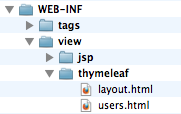
如果你正在开始一个新项目,我们强烈建议你比较 Thymeleaf 和 JSP,以找出哪一个更适合你的需求。
此外,我的同事 Rob Winch 做了一个关于 Spring MVC 的现代模板选项的精彩演示。除了 JSP 和 Thymeleaf,它还讨论了 Mustache 模板。
本博客文章使用的示例应用程序可在 GitHub 上找到。