
领先一步
VMware 提供培训和认证,助您加速进步。
了解更多使用 Spring MVC 生成输出有两种方式
@ResponseBody 方法和 HTTP 消息转换器,通常用于返回 JSON 或 XML 等数据格式。程序客户端、移动应用程序和启用 AJAX 的浏览器是常见的客户端。无论哪种情况,您都需要处理控制器返回的相同数据的多种表示形式(或视图)。确定要返回哪种数据格式称为内容协商。
有三种情况我们需要知道要在 HTTP 响应中发送哪种数据格式
确定用户请求的格式依赖于 ContentNegotationStrategy。开箱即用提供了默认实现,但您也可以根据需要实现自己的。
在这篇文章中,我想讨论如何使用Spring配置和使用内容协商,主要是在使用HTTP消息转换器的RESTful控制器方面。在稍后的一篇文章中,我将展示如何专门为使用Spring的ContentNegotiatingViewResolver视图设置内容协商。
[caption id="attachment_13288" align="alignleft" width="200" caption="获取正确内容"] [/caption]
通过HTTP发出请求时,可以通过设置Accept头属性来指定您想要的响应类型。网络浏览器预设此属性以请求HTML(以及其他内容)。事实上,如果您查看,您会发现浏览器实际上发送了非常令人困惑的Accept头,这使得依赖它们不切实际。请参阅http://www.gethifi.com/blog/browser-rest-http-accept-headers以获取关于此问题的一个很好的讨论。底线:Accept头是混乱的,通常您也无法更改它们(除非您使用JavaScript和AJAX)。
因此,对于Accept头属性不理想的情况,Spring提供了一些约定来替代使用。(这是Spring 3.2中一个很好的变化,它在所有Spring MVC中都提供了灵活的内容选择策略,而不仅仅是在使用视图时)。您可以一次集中配置内容协商策略,它将在需要确定不同格式(媒体类型)的任何地方应用。
Spring支持几种用于选择所需格式的约定:URL后缀和/或URL参数。它们与Accept头的使用并行工作。因此,可以通过三种方式请求内容类型。默认情况下,它们按此顺序检查
http://myserver/myapp/accounts/list.html,则需要HTML。对于电子表格,URL应该是http://myserver/myapp/accounts/list.xls。后缀到媒体类型的映射是通过JavaBeans Activation Framework或JAF自动定义的(因此activation.jar必须在类路径上)。http://myserver/myapp/accounts/list?format=xls。参数的名称默认为format,但可以更改。默认情况下,使用参数是禁用的,但启用后,它会第二个被检查。Accept HTTP头属性。这就是HTTP实际定义的工作方式,但是,如前所述,使用它可能会有问题。设置此功能的Java配置如下所示。只需通过其配置器自定义预定义的内容协商管理器即可。请注意,MediaType辅助类预定义了大多数知名媒体类型的常量。
@Configuration
@EnableWebMvc
public class WebConfig extends WebMvcConfigurerAdapter {

  /**
    * Setup a simple strategy: use all the defaults and return XML by default when not sure.
    */
  @Override
  public void configureContentNegotiation(ContentNegotiationConfigurer configurer) {
    configurer.defaultContentType(MediaType.APPLICATION_XML);
  }
}
使用XML配置时,内容协商策略最容易通过ContentNegotiationManagerFactoryBean进行设置。
   <!--
        Setup a simple strategy:
           1. Take all the defaults.
           2. Return XML by default when not sure.
       -->
  <bean id="contentNegotiationManager"
             class="org.springframework.web.accept.ContentNegotiationManagerFactoryBean">
       <property name="defaultContentType" value="application/xml" />
  </bean>

 <!-- Make this available across all of Spring MVC -->
 <mvc:annotation-driven content-negotiation-manager="contentNegotiationManager" />
通过任何一种设置创建的ContentNegotiationManager都是ContentNegotationStrategy的实现,它实现了上面描述的PPA策略(路径扩展,然后是参数,然后是Accept头)。
在Java配置中,可以通过配置器上的方法完全自定义策略。
@Configuration
@EnableWebMvc
public class WebConfig extends WebMvcConfigurerAdapter {

  /**
    *  Total customization - see below for explanation.
    */
  @Override
  public void configureContentNegotiation(ContentNegotiationConfigurer configurer) {
    configurer.favorPathExtension(false).
            favorParameter(true).
            parameterName("mediaType").
            ignoreAcceptHeader(true).
            useJaf(false).
            defaultContentType(MediaType.APPLICATION_JSON).
            mediaType("xml", MediaType.APPLICATION_XML).
            mediaType("json", MediaType.APPLICATION_JSON);
  }
}
在XML中,可以使用工厂bean上的方法配置策略。
  <!-- Total customization - see below for explanation. -->
  <bean id="contentNegotiationManager"
             class="org.springframework.web.accept.ContentNegotiationManagerFactoryBean">
    <property name="favorPathExtension" value="false" />
    <property name="favorParameter" value="true" />
    <property name="parameterName" value="mediaType" />
    <property name="ignoreAcceptHeader" value="true"/>
    <property name="useJaf" value="false"/>
    <property name="defaultContentType" value="application/json" />

    <property name="mediaTypes">
        <map>
            <entry key="json" value="application/json" />
            <entry key="xml" value="application/xml" />
       </map>
    </property>
</bean>
在两种情况下我们都做了什么
format,而是使用mediaType。Accept头。如果您的多数客户端实际上是网络浏览器(通常通过AJAX进行REST调用),这通常是最好的方法。
为了演示,我将一个简单的账户列表应用程序作为我们的示例——截图显示了HTML格式的典型账户列表。完整代码可以在Github上找到:https://github.com/paulc4/mvc-content-neg。
要以 JSON 或 XML 格式返回账户列表,我需要一个像这样的控制器。我们暂时忽略生成 HTML 的方法。
@Controller
class AccountController {
    @RequestMapping(value="/accounts", method=RequestMethod.GET)
    @ResponseStatus(HttpStatus.OK)
    public @ResponseBody List<Account> list(Model model, Principal principal) {
        return accountManager.getAccounts(principal) );
    }

    // Other methods ...
}
这是内容协商策略的设置
	<!-- Simple strategy: only path extension is taken into account -->
	<bean id="cnManager"
		class="org.springframework.web.accept.ContentNegotiationManagerFactoryBean">
		<property name="favorPathExtension" value="true"/>
		<property name="ignoreAcceptHeader" value="true" />
		<property name="defaultContentType" value="text/html" />
		<property name="useJaf" value="false"/>

		<property name="mediaTypes">
			<map>
				<entry key="html" value="text/html" />
				<entry key="json" value="application/json" />
				<entry key="xml" value="application/xml" />
			</map>
		</property>
	</bean>
或者,使用Java配置,代码看起来像这样
	@Override
	public void configureContentNegotiation(
			ContentNegotiationConfigurer configurer) {
		// Simple strategy: only path extension is taken into account
		configurer.favorPathExtension(true).
			ignoreAcceptHeader(true).
			useJaf(false).
			defaultContentType(MediaType.TEXT_HTML).
			mediaType("html", MediaType.TEXT_HTML).
			mediaType("xml", MediaType.APPLICATION_XML).
			mediaType("json", MediaType.APPLICATION_JSON);
	}
只要我的类路径上有JAXB2和Jackson,Spring MVC就会自动设置必要的HttpMessageConverters。我的领域类也必须用JAXB2和Jackson注解标记,以启用转换(否则消息转换器不知道该做什么)。根据下面的评论,带注解的Account类显示在下方。
这是我们的Accounts应用程序的JSON输出(请注意URL中的路径扩展)。
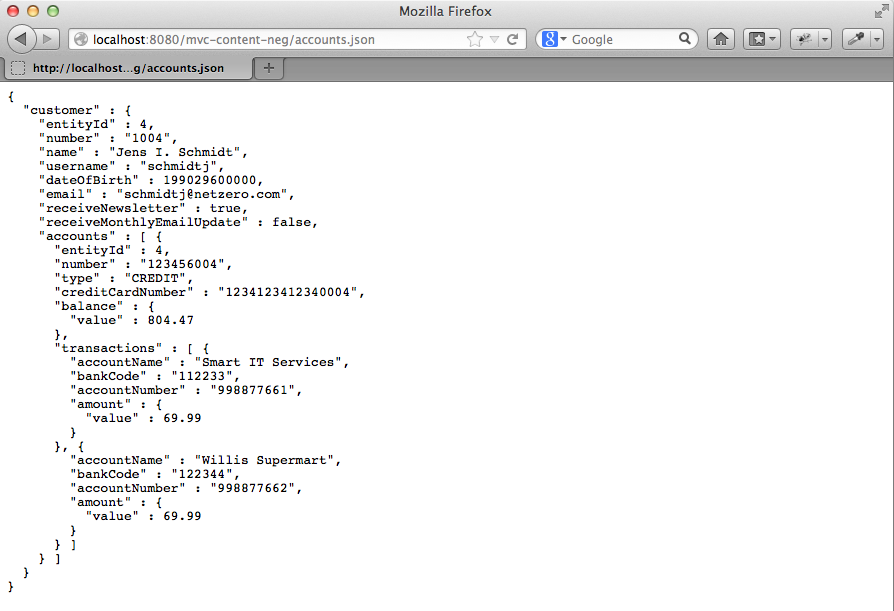
系统如何知道是转换为XML还是JSON?这是因为内容协商——根据ContentNegotiationManager的配置方式,上面讨论的三种(PPA策略)选项中的任何一种都将被使用。在这种情况下,URL以accounts.json结尾,因为路径扩展是唯一启用的策略。
在示例代码中,您可以通过在web.xml中设置活动配置文件来在MVC的XML或Java配置之间切换。配置文件分别为“xml”和“javaconfig”。
Spring MVC的REST支持建立在现有MVC控制器框架之上。因此,同一个Web应用程序既可以返回原始数据(如JSON),也可以使用演示格式(如HTML)。
这两种技术可以在同一个控制器中轻松地并行使用,就像这样
@Controller
class AccountController {
    // RESTful method
    @RequestMapping(value="/accounts", produces={"application/xml", "application/json"})
    @ResponseStatus(HttpStatus.OK)
    public @ResponseBody List<Account> listWithMarshalling(Principal principal) {
        return accountManager.getAccounts(principal);
    }

    // View-based method
    @RequestMapping("/accounts")
    public String listWithView(Model model, Principal principal) {
        // Call RESTful method to avoid repeating account lookup logic
        model.addAttribute( listWithMarshalling(principal) );

        // Return the view to use for rendering the response
        return ¨accounts/list¨;
    }
}
这里有一个简单的模式:@ResponseBody方法处理所有数据访问以及与底层服务层(AccountManager)的集成。第二种方法调用第一种方法,并在Model中设置响应以供View使用。这避免了重复的逻辑。
为了确定选择哪种@RequestMapping方法,我们再次使用PPA内容协商策略。它允许produces选项工作。以accounts.xml或accounts.json结尾的URL映射到第一个方法,任何其他以accounts.anything结尾的URL映射到第二个方法。
ContentNegotiatingViewResolver发挥作用的地方,这将是我下一篇文章的主题。我要感谢Rossen Stoyanchev在撰写此文时提供的帮助。如有任何错误,均由我本人承担。
2013年6月2日增补.
由于有一些关于如何为JAXB注解类的问题,这里是Account类的一部分。为简洁起见,我省略了数据成员和除了带注解的getter之外的所有方法。如果愿意,我可以直接注解数据成员(就像JPA注解一样)。请记住,Jackson可以使用这些相同的注解将对象编组为JSON。
/**
 * Represents an account for a member of a financial institution. An account has
 * zero or more {@link Transaction}s and belongs to a {@link Customer}. An aggregate entity.
 */
@Entity
@Table(name = "T_ACCOUNT")
@XmlRootElement
public class Account {

	// data-members omitted ...

	public Account(Customer owner, String number, String type) {
		this.owner = owner;
		this.number = number;
		this.type = type;
	}

	/**
	 * Returns the number used to uniquely identify this account.
	 */
	@XmlAttribute
	public String getNumber() {
		return number;
	}

	/**
	 * Get the account type.
	 *
	 * @return One of "CREDIT", "SAVINGS", "CHECK".
	 */
	@XmlAttribute
	public String getType() {
		return type;
	}

	/**
	 * Get the credit-card, if any, associated with this account.
	 *
	 * @return The credit-card number or null if there isn't one.
	 */
	@XmlAttribute
	public String getCreditCardNumber() {
		return StringUtils.hasText(creditCardNumber) ? creditCardNumber : null;
	}

	/**
	 * Get the balance of this account in local currency.
	 *
	 * @return Current account balance.
	 */
	@XmlAttribute
	public MonetaryAmount getBalance() {
		return balance;
	}


	/**
	 * Returns a single account transaction. Callers should not attempt to hold
	 * on or modify the returned object. This method should only be used
	 * transitively; for example, called to facilitate reporting or testing.
	 *
	 * @param name
	 *            the name of the transaction account e.g "Fred Smith"
	 * @return the beneficiary object
	 */
	@XmlElement   // Make these a nested <transactions> element
	public Set<Transaction> getTransactions() {
		return transactions;
	}

    // Setters and other methods ...

}