
领先一步
VMware 提供培训和认证,助您加速进步。
了解更多Spring Security 以其高度可定制性而闻名,因此在我第一次尝试使用 Google App Engine 时,我决定创建一个简单的应用程序,通过实现一些核心 Spring Security 接口来探索 GAE 功能的使用。本文我们将了解如何:
您应该已经熟悉将应用程序部署到 GAE。启动和运行一个基本应用程序不需要很长时间,您将在 GAE 网站上找到大量相关指导。
注册用户存储为GAE数据存储实体。首次认证时,新用户会被重定向到注册页面,在那里他们可以输入自己的姓名。一旦注册,用户账户可以在数据存储中被标记为“禁用”,用户将不允许使用该应用程序,即使他们已经通过GAE认证。
过滤器将认证决策委托给AuthenticationManager,它配置了一个AuthenticationProviderbean 列表,其中任何一个都可以认证用户,或者在认证失败时抛出异常。
在基于表单的登录情况下,AuthenticationEntryPoint简单地将用户重定向到登录页面。认证过滤器(UsernamePasswordAuthenticationFilter在这种情况下)从提交的 POST 请求中提取用户名和密码。它们存储在一个Authentication对象中,并传递给一个AuthenticationProvider,它通常会将用户的密码与存储在数据库或 LDAP 服务器中的密码进行比较。
这是组件之间的基本交互。这如何应用于 GAE 应用程序?
import com.google.appengine.api.users.UserService;
import com.google.appengine.api.users.UserServiceFactory;

public class GoogleAccountsAuthenticationEntryPoint implements AuthenticationEntryPoint {
  public void commence(HttpServletRequest request, HttpServletResponse response, AuthenticationException authException)
      throws IOException, ServletException {
    UserService userService = UserServiceFactory.getUserService();

    response.sendRedirect(userService.createLoginURL(request.getRequestURI()));
  }
}
如果我们将其添加到我们的配置中,使用 Spring Security 命名空间为此目的提供的特定钩子,我们将得到类似以下内容
<b:beans xmlns="http://www.springframework.org/schema/security"
        xmlns:b="http://www.springframework.org/schema/beans"
        xmlns:xsi="http://www.w3.org/2001/XMLSchema-instance"
        xsi:schemaLocation="http://www.springframework.org/schema/beans http://www.springframework.org/schema/beans/spring-beans-3.0.xsd
        http://www.springframework.org/schema/security http://www.springframework.org/schema/security/spring-security-3.1.xsd">

    <http use-expressions="true" entry-point-ref="gaeEntryPoint">
        <intercept-url pattern="/" access="permitAll" />
        <intercept-url pattern="/**" access="hasRole('USER')" />
    </http>

    <b:bean id="gaeEntryPoint" class="samples.gae.security.GoogleAccountsAuthenticationEntryPoint" />
    ...
</b:beans>
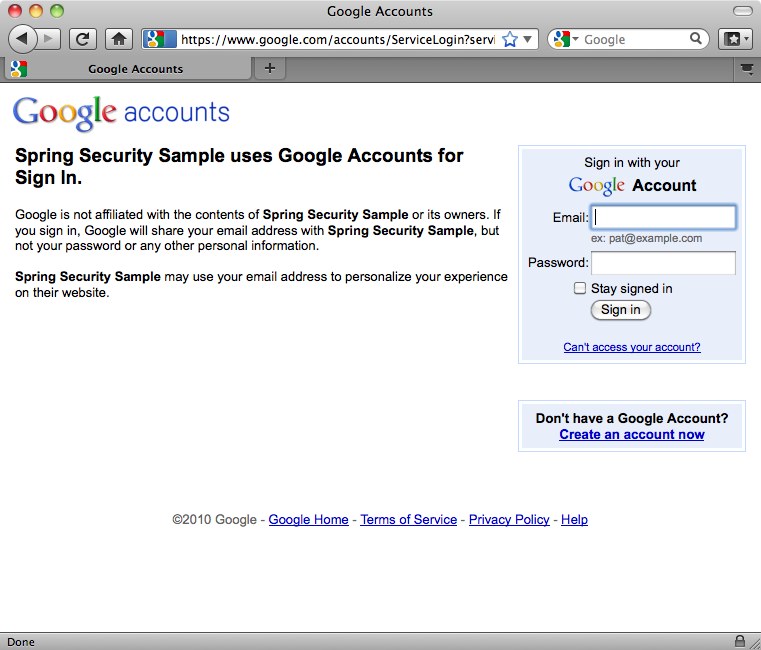
在这里,我们已将所有 URL 配置为需要“USER”角色,除了 Web 应用程序根目录。当用户首次尝试访问任何其他页面时,他们将被重定向到 Google 账户登录屏幕。
public class GaeAuthenticationFilter extends GenericFilterBean {
  private static final String REGISTRATION_URL = "/register.htm";
  private AuthenticationDetailsSource ads = new WebAuthenticationDetailsSource();
  private AuthenticationManager authenticationManager;
  private AuthenticationFailureHandler failureHandler = new SimpleUrlAuthenticationFailureHandler();

  public void doFilter(ServletRequest request, ServletResponse response, FilterChain chain) throws IOException, ServletException {
    Authentication authentication = SecurityContextHolder.getContext().getAuthentication();

    if (authentication == null) {
      // User isn't authenticated. Check if there is a Google Accounts user
      User googleUser = UserServiceFactory.getUserService().getCurrentUser();

      if (googleUser != null) {
        // User has returned after authenticating through GAE. Need to authenticate to Spring Security.
        PreAuthenticatedAuthenticationToken token = new PreAuthenticatedAuthenticationToken(googleUser, null);
        token.setDetails(ads.buildDetails(request));

        try {
          authentication = authenticationManager.authenticate(token);
          // Setup the security context
          SecurityContextHolder.getContext().setAuthentication(authentication);
          // Send new users to the registration page.
          if (authentication.getAuthorities().contains(AppRole.NEW_USER)) {
            ((HttpServletResponse) response).sendRedirect(REGISTRATION_URL);
              return;
          }
        } catch (AuthenticationException e) {
         // Authentication information was rejected by the authentication manager
          failureHandler.onAuthenticationFailure((HttpServletRequest)request, (HttpServletResponse)response, e);
          return;
        }
      }
    }

    chain.doFilter(request, response);
  }

  public void setAuthenticationManager(AuthenticationManager authenticationManager) {
    this.authenticationManager = authenticationManager;
  }

  public void setFailureHandler(AuthenticationFailureHandler failureHandler) {
    this.failureHandler = failureHandler;
  }
}
我们从头开始实现了这个过滤器,使其更易于理解并避免了继承现有类的复杂性。如果用户当前未通过身份验证(从 Spring Security 的角度来看),过滤器会检查 GAE 用户是否存在(再次利用 GAE 的UserService)。如果找到,则将其封装在一个合适的身份验证令牌对象中(为方便起见,此处使用 Spring Security 的PreAuthenticatedAuthenticationToken),并将其传递给AuthenticationManager由 Spring Security 进行认证。新用户此时将被重定向到注册页面。
的AuthenticationProvider实现与一个UserRegistry交互,用于存储和检索GaeUser对象(两者都特定于此示例)
public interface UserRegistry {
  GaeUser findUser(String userId);
  void registerUser(GaeUser newUser);
  void removeUser(String userId);
}
public class GaeUser implements Serializable {
  private final String userId;
  private final String email;
  private final String nickname;
  private final String forename;
  private final String surname;
  private final Set<AppRole> authorities;
  private final boolean enabled;

// Constructors and accessors omitted
...
的userId是 Google 账户分配的唯一 ID。电子邮件和昵称也从 GAE 用户获取。名字和姓氏在注册表单中输入。除非直接通过 GAE 数据存储管理控制台修改,否则启用标志设置为“true”。AppRole是 Spring Security 的GrantedAuthority作为枚举的实现
public enum AppRole implements GrantedAuthority {
    ADMIN (0),
    NEW_USER (1),
    USER (2);

    private int bit;

    AppRole(int bit) {
        this.bit = bit;
    }

    public String getAuthority() {
        return toString();
    }
}
角色如上所述分配。然后AuthenticationProvider看起来像这样
public class GoogleAccountsAuthenticationProvider implements AuthenticationProvider {
    private UserRegistry userRegistry;

    public Authentication authenticate(Authentication authentication) throws AuthenticationException {
        User googleUser = (User) authentication.getPrincipal();

        GaeUser user = userRegistry.findUser(googleUser.getUserId());

        if (user == null) {
            // User not in registry. Needs to register
            user = new GaeUser(googleUser.getUserId(), googleUser.getNickname(), googleUser.getEmail());
        }

        if (!user.isEnabled()) {
            throw new DisabledException("Account is disabled");
        }

        return new GaeUserAuthentication(user, authentication.getDetails());
    }

    public final boolean supports(Class<?> authentication) {
        return PreAuthenticatedAuthenticationToken.class.isAssignableFrom(authentication);
    }

    public void setUserRegistry(UserRegistry userRegistry) {
        this.userRegistry = userRegistry;
    }
}
的GaeUserAuthentication类是 Spring Security 的一个非常简单的实现Authentication接口,它将GaeUser对象作为主体。如果您之前对 Spring Security 有过一些定制,您可能会想知道为什么我们在这里没有实现UserDetailsService,以及为什么主体不是一个UserDetails实例。简单的答案是您不必这样做——Spring Security 通常不关心对象的类型是什么,在这里我们选择直接实现AuthenticationProvider接口作为最简单的选项。
import com.google.appengine.api.datastore.*;
import org.springframework.security.core.GrantedAuthority;
import samples.gae.security.AppRole;
import java.util.*;

public class GaeDatastoreUserRegistry implements UserRegistry {
    private static final String USER_TYPE = "GaeUser";
    private static final String USER_FORENAME = "forename";
    private static final String USER_SURNAME = "surname";
    private static final String USER_NICKNAME = "nickname";
    private static final String USER_EMAIL = "email";
    private static final String USER_ENABLED = "enabled";
    private static final String USER_AUTHORITIES = "authorities";

    public GaeUser findUser(String userId) {
        Key key = KeyFactory.createKey(USER_TYPE, userId);
        DatastoreService datastore = DatastoreServiceFactory.getDatastoreService();

        try {
            Entity user = datastore.get(key);

            long binaryAuthorities = (Long)user.getProperty(USER_AUTHORITIES);
            Set<AppRole> roles = EnumSet.noneOf(AppRole.class);

            for (AppRole r : AppRole.values()) {
                if ((binaryAuthorities & (1 << r.getBit())) != 0) {
                    roles.add(r);
                }
            }

            GaeUser gaeUser = new GaeUser(
                    user.getKey().getName(),
                    (String)user.getProperty(USER_NICKNAME),
                    (String)user.getProperty(USER_EMAIL),
                    (String)user.getProperty(USER_FORENAME),
                    (String)user.getProperty(USER_SURNAME),
                    roles,
                    (Boolean)user.getProperty(USER_ENABLED));

            return gaeUser;

        } catch (EntityNotFoundException e) {
            logger.debug(userId + " not found in datastore");
            return null;
        }
    }

    public void registerUser(GaeUser newUser) {
        Key key = KeyFactory.createKey(USER_TYPE, newUser.getUserId());
        Entity user = new Entity(key);
        user.setProperty(USER_EMAIL, newUser.getEmail());
        user.setProperty(USER_NICKNAME, newUser.getNickname());
        user.setProperty(USER_FORENAME, newUser.getForename());
        user.setProperty(USER_SURNAME, newUser.getSurname());
        user.setUnindexedProperty(USER_ENABLED, newUser.isEnabled());

        Collection<? extends GrantedAuthority> roles = newUser.getAuthorities();

        long binaryAuthorities = 0;

        for (GrantedAuthority r : roles) {
            binaryAuthorities |= 1 << ((AppRole)r).getBit();
        }

        user.setUnindexedProperty(USER_AUTHORITIES, binaryAuthorities);

        DatastoreService datastore = DatastoreServiceFactory.getDatastoreService();
        datastore.put(user);
    }

    public void removeUser(String userId) {
        DatastoreService datastore = DatastoreServiceFactory.getDatastoreService();
        Key key = KeyFactory.createKey(USER_TYPE, userId);

        datastore.delete(key);
    }
}
正如我们已经提到的,示例使用枚举表示应用程序角色。分配给用户的角色(权限)存储为EnumSet. EnumSets 非常节省资源,用户的角色可以存储为单个long值,从而简化了与数据存储 API 的交互。为此,我们为每个角色分配了一个单独的“位”属性。
用户注册控制器包含以下处理注册表单提交的方法。
    @Autowired
    private UserRegistry registry;

    @RequestMapping(method = RequestMethod.POST)
    public String register(@Valid RegistrationForm form, BindingResult result) {
        if (result.hasErrors()) {
            return null;
        }

        Authentication authentication = SecurityContextHolder.getContext().getAuthentication();
        GaeUser currentUser = (GaeUser)authentication.getPrincipal();
        Set<AppRole> roles = EnumSet.of(AppRole.USER);

        if (UserServiceFactory.getUserService().isUserAdmin()) {
            roles.add(AppRole.ADMIN);
        }

        GaeUser user = new GaeUser(currentUser.getUserId(), currentUser.getNickname(), currentUser.getEmail(),
                form.getForename(), form.getSurname(), roles, true);

        registry.registerUser(user);

        // Update the context with the full authentication
        SecurityContextHolder.getContext().setAuthentication(new GaeUserAuthentication(user, authentication.getDetails()));

        return "redirect:/home.htm";
    }
用户使用提供的名字和姓氏创建,并创建一组新的角色。如果 GAE 指示当前用户是应用程序的管理员,这也可能包括“ADMIN”角色。然后将其存储在用户注册表中,并且安全上下文将填充更新的Authentication对象,以确保 Spring Security 了解新的角色信息并相应地应用其访问控制约束。
安全应用程序上下文现在看起来像这样
    <http use-expressions="true" entry-point-ref="gaeEntryPoint">
        <intercept-url pattern="/" access="permitAll" />
        <intercept-url pattern="/register.htm*" access="hasRole('NEW_USER')" />
        <intercept-url pattern="/**" access="hasRole('USER')" />
        <custom-filter position="PRE_AUTH_FILTER" ref="gaeFilter" />
    </http>

    <b:bean id="gaeEntryPoint" class="samples.gae.security.GoogleAccountsAuthenticationEntryPoint" />

    <b:bean id="gaeFilter" class="samples.gae.security.GaeAuthenticationFilter">
        <b:property name="authenticationManager" ref="authenticationManager"/>
    </b:bean>

    <authentication-manager alias="authenticationManager">
        <authentication-provider ref="gaeAuthenticationProvider"/>
    </authentication-manager>

    <b:bean id="gaeAuthenticationProvider" class="samples.gae.security.GoogleAccountsAuthenticationProvider">
        <b:property name="userRegistry" ref="userRegistry" />
    </b:bean>

    <b:bean id="userRegistry" class="samples.gae.users.GaeDatastoreUserRegistry" />
您可以看到我们使用了custom-filter命名空间元素插入了我们的过滤器,声明了提供程序和用户注册表并将它们全部连接起来。我们还为注册控制器添加了一个 URL,新用户可以访问该 URL。
Spring Security 多年来已经证明它足够灵活,可以在许多不同的场景中增加价值,部署在 Google App Engine 中也不例外。还值得记住的是,自己实现一些接口(就像我们在这里所做的)通常是比尝试使用一个不太合适的现有类更好的方法。您最终可能会得到一个更简洁、更符合您需求的解决方案。
这里的重点是如何在启用 Spring Security 的应用程序中使用 Google App Engine API。我们没有涵盖应用程序如何工作的所有其他细节,但我鼓励您查看代码并亲身体验。如果您是 GAE 专家,那么随时欢迎提出改进建议!
示例代码已在 3.1 代码库中,您可以从我们的 git 仓库中检出。Spring Security 3.1 的第一个里程碑版本也应该在本月晚些时候发布。