
领先一步
VMware 提供培训和认证,助您加速进步。
了解更多更快的資訊處理不僅能提供資訊,更能改變我們的感知和創新方式。
Spring AI,一個將 AI 功能整合到 Spring 應用程式的強大框架,現在支援 Groq——一個極速的 AI 推理引擎,支援工具/函式呼叫。
透過利用 Groq 的 OpenAI 相容 API,Spring AI 透過調整其現有的 OpenAI Chat 客戶端,實現了無縫整合。這種方法使開發人員能夠透過熟悉的 Spring AI API 來利用 Groq 的高性能模型。
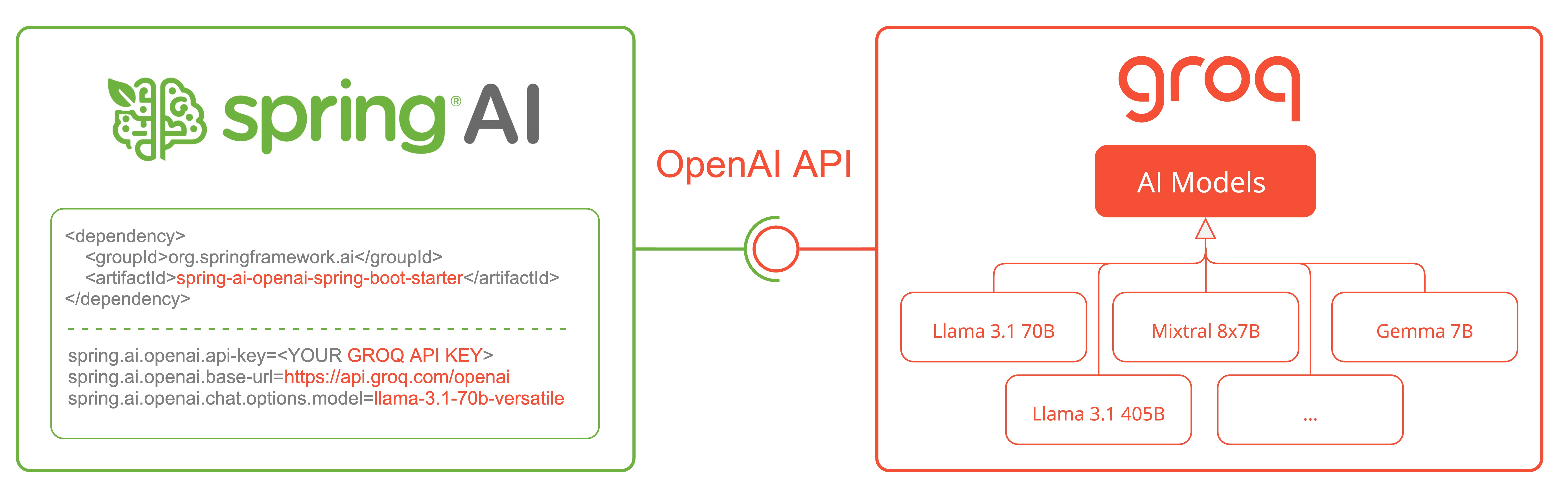
我們將探討如何配置和使用 Spring AI OpenAI Chat 客戶端連接 Groq。有關詳細資訊,請參閱 Spring AI 的 Groq 文件和相關 測試。
若要與 Groq 互動,您需要從 https://console.groq.com/keys 取得 Groq API 金鑰。
將 Spring AI OpenAI 啟動器新增至您的專案。
<dependency>
  <groupId>org.springframework.ai</groupId>
  <artifactId>spring-ai-openai-spring-boot-starter</artifactId>
</dependency>
對於 Gradle,請將此新增到您的 build.gradle
dependencies {
  implementation 'org.springframework.ai:spring-ai-openai-spring-boot-starter'
}
請確保您已新增 Spring Milestone 和 Snapshot 儲存庫並新增 Spring AI BOM。
要將 Groq 與 Spring AI 結合使用,我們需要將 OpenAI 客戶端配置為指向 Groq 的 API 端點並使用 Groq 特有的模型。
將以下環境變數新增到您的專案
export SPRING_AI_OPENAI_API_KEY=<INSERT GROQ API KEY HERE>
export SPRING_AI_OPENAI_BASE_URL=https://api.groq.com/openai
export SPRING_AI_OPENAI_CHAT_OPTIONS_MODEL=llama3-70b-8192
或者,您也可以將這些新增到您的 application.properties 檔案中
spring.ai.openai.api-key=<GROQ_API_KEY>
spring.ai.openai.base-url=https://api.groq.com/openai
spring.ai.openai.chat.options.model=llama3-70b-8192
spring.ai.openai.chat.options.temperature=0.7
重點
api-key 設定為您的其中一個 Groq 金鑰。base-url 設定為 Groq 的 API 端點:https://api.groq.com/openaimodel 設定為 Groq 可用的 模型之一。如需完整的配置屬性清單,請參閱 Groq Chat 屬性文件。
既然我們已經將 Spring AI 配置為使用 Groq,讓我們來看看一個簡單的範例,說明如何在您的應用程式中使用它。
@RestController
public class ChatController {

  private final ChatClient chatClient;

  @Autowired
  public ChatController(ChatClient.Builder builder) {
      this.chatClient = builder.build();
  }

  @GetMapping("/ai/generate")
  public Map generate(@RequestParam(value = "message", defaultValue = "Tell me a joke") String message) {
     String response = chatClient.prompt().user(message).call().content();
     return Map.of("generation", response);
  }

  @GetMapping("/ai/generateStream")
  public Flux<String> generateStream(@RequestParam(value = "message",
        defaultValue = "Tell me a joke") String message) {
      return chatClient.prompt().user(message).stream().content();
  }
}
在此範例中,我們創建了一個帶有兩個端點的簡單 REST 控制器
/ai/generate:對給定的提示生成單一回應。/ai/generateStream:串流回應,這對於較長的輸出或即時互動很有用。當選擇支援工具/函式的模型之一時,Groq API 端點支援 工具/函式呼叫。
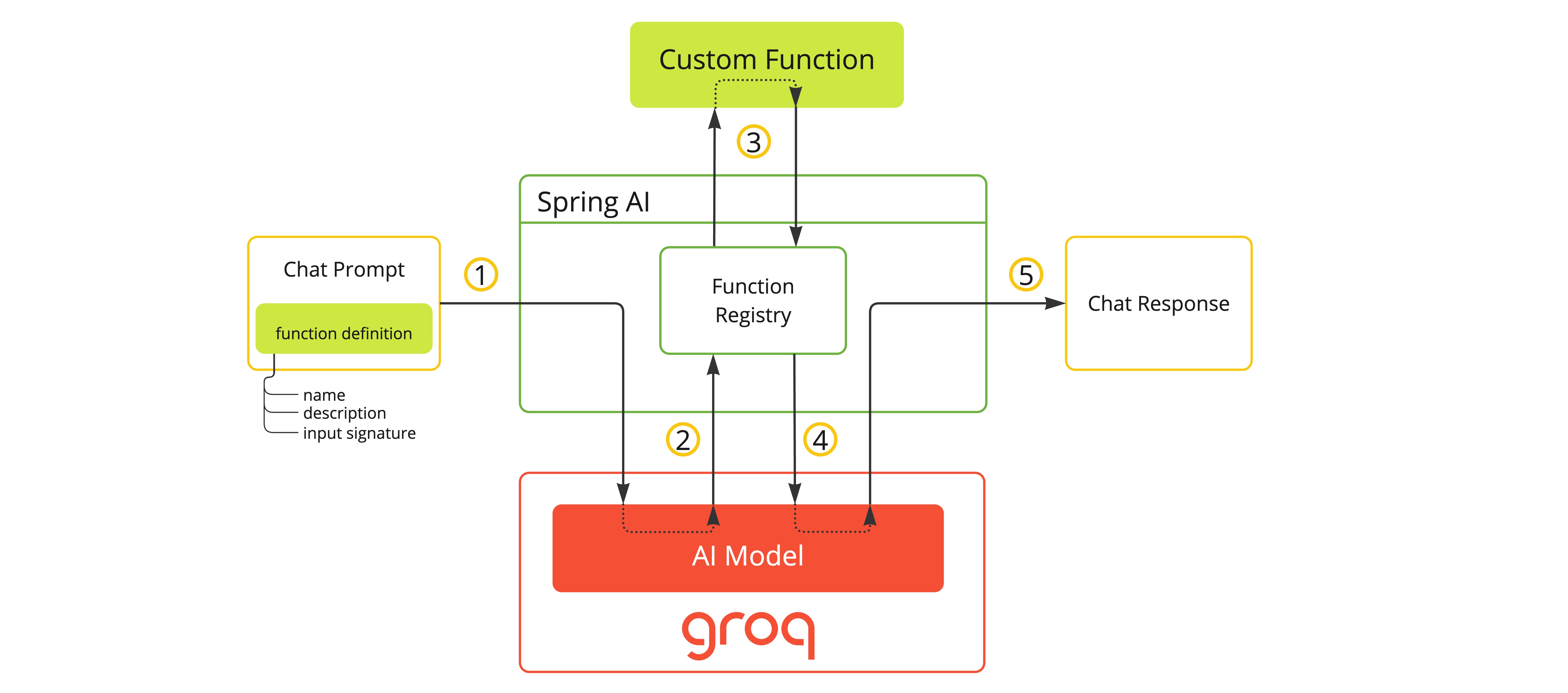
您可以將自訂 Java 函式註冊到您的 ChatModel,並讓提供的 Groq 模型智慧地選擇輸出一個 JSON 物件,其中包含呼叫一個或多個已註冊函式的引數。這是一種強大的技術,可以將 LLM 的能力與外部工具和 API 連接起來。
以下是如何使用 Groq 函式呼叫與 Spring AI 的簡單範例
@SpringBootApplication
public class GroqApplication {

	public static void main(String[] args) {
		SpringApplication.run(GroqApplication.class, args);
	}

	@Bean
	CommandLineRunner runner(ChatClient.Builder chatClientBuilder) {
		return args -> {
			var chatClient = chatClientBuilder.build();

			var response = chatClient.prompt()
				.user("What is the weather in Amsterdam and Paris?")
				.functions("weatherFunction") // reference by bean name.
				.call()
				.content();

			System.out.println(response);
		};
	}

	@Bean
	@Description("Get the weather in location")
	public Function<WeatherRequest, WeatherResponse> weatherFunction() {
		return new MockWeatherService();
	}

	public static class MockWeatherService implements Function<WeatherRequest, WeatherResponse> {

		public record WeatherRequest(String location, String unit) {}
		public record WeatherResponse(double temp, String unit) {}

		@Override
		public WeatherResponse apply(WeatherRequest request) {
			double temperature = request.location().contains("Amsterdam") ? 20 : 25;
			return new WeatherResponse(temperature, request.unit);
		}
	}
}
在此範例中,當模型需要天氣資訊時,它將自動呼叫 weatherFunction bean,然後該 bean 可以獲取即時天氣資料。
預期的回應如下:「阿姆斯特丹目前氣溫為 20 攝氏度,巴黎目前氣溫為 25 攝氏度。」
閱讀更多關於 OpenAI 函式呼叫的資訊。
在使用 Groq 和 Spring AI 時,請記住以下幾點
將 Groq 與 Spring AI 整合為尋求在其 Spring 應用程式中利用高性能 AI 模型的開發人員打開了新的可能性。透過重新利用 OpenAI 客戶端,Spring AI 可以輕鬆地在不同的 AI 供應商之間切換,讓您能夠為特定需求選擇最佳解決方案。
在探索此整合時,請記住隨時了解 Spring AI 和 Groq 的最新文件,因為功能和相容性可能會隨時間演進。
我們鼓勵您嘗試不同的 Groq 模型,並比較它們的效能和輸出,以找到最適合您使用案例的解決方案。
祝您編碼愉快,並享受 Groq 為您的人工智慧驅動的 Spring 應用程式帶來的速度和功能!